

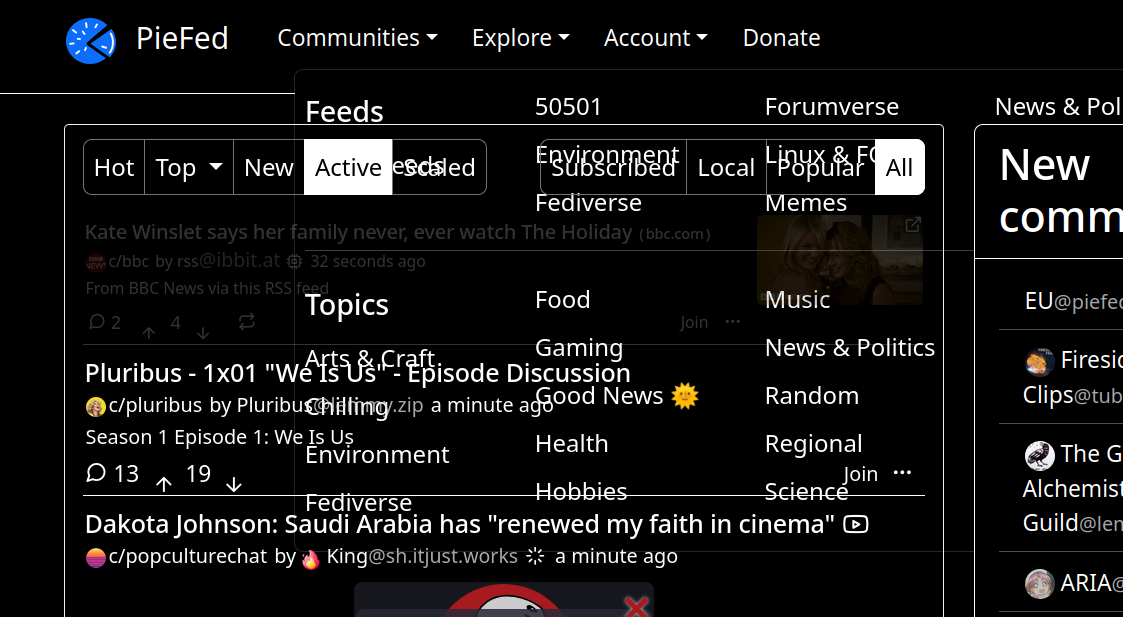
So I have seen this for awhile and had not mentioned something before partially because its not a game stopper and so many things are going on with piefed dev I hated to bother. I kinda expected other people would be seeing it and it would likely get attention and maybe it has but I just have not seen it. Anyway I attached a screenshot showing how the dropdown menus get obscured by the site and its not just obscured because the site under the dropdown seems to have interaction priority. The funny thing is when I click on images and get the larger version like sometimes something like this happens and at other times the pop up image will correctly be in front of everything. Im not sure if its the type of image or what but the effect does not always happen with pop up image. It basically always happens with the drop downs though. I changed to default theme and some other themes and this issue consistantly happens.
Yep I have recent Firefox on Linux too.
Do you have any unusual browser extensions?
eyup. turned off all my extensions which are not problematic to stop and it looks better. feel a bit foolish. will enable them one at a time and get back to you on the extension that caused it. no wonder no ones every mentioned it.
I bet it’s textise this or printfriendly.
not sure. having turned them all back on one at a time it did not come back. I sorta did it in order of importance so textise this was second to last before camelizer.
This actually has been happening for me since I started piefed so should be various versions of firefox as I know I have upgraded it at least half a dozen times. I have no script (both things listed are allowed. piefed.social and cloudflareinsights), bitwarden, authenticator, printfriendly, tab session manager, foxytab, open link with new tab, power tabs, privacy badger, redirctor, terms of service didn’t read, textise this, and camelizer. Sorry I had not thought to goof around with browser. it looks fine unlogged in in chrom and edge. ill try disabling addons and see if anything helps.